DVAR function
- Database Functions
- DcountDcountaDgetDmaxDminDaverageDproductDstdev
DVAR
Returns the bias-corrected sample variance of values in a column of a Calc 'database' table, in rows which meet specified criteria.
Syntax:
DVAR(database_table; field; criteria_table)
where
- database_table is a range defining the data to be examined.
- field is the column to examine. It may be a column number (1 is the first column of the database table, 2 is the second ...) or a column header (enclosed in quotation marks ””) or a cell referring to a column header.
- criteria_table is a range containing criteria, which are used to select which rows of the database_table to examine.
- The Database functions overview describes these parameters in detail.
DVAR returns the bias-corrected sample variance, which assumes that the chosen rows of the database_table contain a random sample of a normally distributed population. If the chosen data are the entire population, use * DVARP instead. The DVAR calculation uses this formula: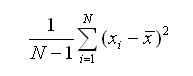
where N is the number of values included and xi are those values.
DVAR ignores any cell containing text in the field column.
Simply put, variance is a measure of how widely spread data values are. It is the square of the standard deviation (see * DSTDEV, * DSTDEVP). Variance is a reliable measure only if there is enough data to examine.
Example:
In this spreadsheet:
A B C D E 1 Name Grade Age Distance to School Weight 2 Andy 3 9 150 40 3 Betty 4 10 1000 42 4 Charles 3 10 300 51 5 Daniel 5 11 1200 48 6 Eva 2 8 650 33 7 Frank 2 7 300 42 8 Greta 1 7 200 36 9 Harry 3 9 1200 44 10 Irene 2 8 1000 42 11 12 13 Name Grade Age Distance to School Weight 14 2
DVAR(A1:E10; "Weight"; A13:E14)- returns the bias-corrected sample variance of the weights of children in the second grade. This is not a useful measure, as there are so few children.
Issues:
- The OOo2.3 Help implies that 0 as a field will include the entire database table. This seems to be wrong - only the variance of a single column can be found.
- Logical values TRUE and FALSE are interpreted as 1 and 0 in the calculation. This is not compatible with Excel, which ignores logical values. This will very rarely cause difficulty.
See Also
-

